
.png)
Description
Download AI T Shirt Generator – AI‑Powered Design Tool for Custom Tees
Introduction
In today’s fast‑moving digital marketplace, creators, entrepreneurs, and casual hobbyists alike are constantly searching for tools that let them bring ideas to life quickly, affordably, and without a steep learning curve. AI T Shirt Generator answers that call by combining the power of artificial intelligence with a user‑friendly, cloud‑based design environment specifically built for custom apparel. Whether you’re looking to launch a limited‑edition streetwear line, test a brand concept, or simply print a quirky personal design for a friend’s birthday, this platform eliminates the need for expensive software licenses, intricate vector‑editing skills, or outsourcing to a graphic designer. The service runs entirely in the browser, meaning you can start creating from any modern device—desktop, laptop, tablet, or smartphone—while enjoying real‑time rendering, secure cloud storage, and one‑click print‑on‑demand fulfillment. Over the next sections we’ll dive deep into the core features, walk through the installation‑free workflow, examine compatibility across operating systems, weigh the pros and cons, and answer the most common questions users have about the tool. By the end of this review, you’ll have a clear picture of whether AI T Shirt Generator is the right solution for your next custom‑tee project.
Overview
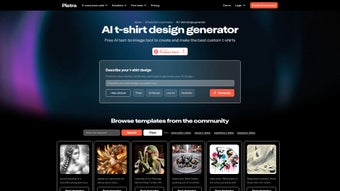
AI T Shirt Generator is a cloud‑based creative tool that leverages cutting‑edge artificial intelligence to turn simple text prompts into eye‑catching t‑shirt graphics. Whether you’re a freelance designer, a small business owner, or just someone who loves to wear a personal statement, this platform eliminates the steep learning curve of traditional design software. By selecting from a rich library of templates—ranging from photorealistic mockups to minimalist line art and even three‑dimensional renderings—users can experiment with countless styles without needing any prior design experience. The interface is intentionally streamlined: you type a description, choose a preferred aesthetic, and the AI instantly generates multiple visual concepts. From there, you can fine‑tune colors, swap fonts, or reposition elements using drag‑and‑drop controls that feel as intuitive as a modern mobile app. Once satisfied, the platform offers a seamless checkout flow that lets you order high‑quality, pre‑shrunk cotton tees with free worldwide shipping. In addition to the design workflow, AI T Shirt Generator hosts a vibrant community hub where creators share their latest drafts, seek feedback, and even collaborate on limited‑edition drops. The service operates on a subscription model with a free tier that lets you create and download low‑resolution previews, while premium members unlock unlimited high‑resolution exports, priority rendering, and bulk‑order discounts. Overall, AI T Shirt Generator presents a secure, fast, and cost‑effective way to bring your wearable ideas to life without the overhead of hiring a graphic artist or mastering Photoshop, making it an attractive option for both newcomers and seasoned designers alike.
Key Features of AI T Shirt Generator
- Text‑to‑Image AI Engine: Convert natural language descriptions into fully rendered tee graphics in seconds.
- Extensive Template Library: Over 500 ready‑made layouts covering photorealistic, line art, vintage, graffiti, and 3D mockups.
- Real‑Time Editing Tools: Drag‑and‑drop elements, adjust color palettes, add typography, and apply filters without leaving the browser.
- Multi‑Platform Access: Fully responsive web app works on Windows, macOS, Android, and iOS devices; no installation required.
- Community Marketplace: Share designs, receive community feedback, and discover trending styles from other creators.
- One‑Click Print & Ship: Order custom tees directly from the platform with high‑resolution printing on premium cotton and free global delivery.
- Secure Cloud Storage: All projects are saved securely in the cloud, allowing you to revisit and edit past designs from any device.
- Version History & Export Options: Download PNG, SVG, or PDF files, and revert to previous iterations with a single click.
- Subscription Flexibility: Free tier for hobbyists, monthly/annual plans for power users, and enterprise licensing for brands.
- AI‑Assisted Inspiration: “Explore” mode suggests trending motifs, color schemes, and layout ideas based on your input.
The combination of these features creates a robust yet approachable environment that democratizes graphic design for apparel. The AI engine is continuously updated—thanks to regular model fine‑tuning—so users benefit from improvements in image fidelity, style diversity, and rendering speed without needing to download patches or apply manual updates. Security is baked in: all data transmissions are encrypted via HTTPS, and user accounts are protected with two‑factor authentication. For businesses, the platform also provides API access, enabling integration with existing e‑commerce workflows or custom order‑fulfillment pipelines. In addition, the tool offers a collaborative workspace where teams can comment directly on design drafts, assign tasks, and track version changes, making it suitable for larger branding projects. The extensive export options mean you can take your creations into other design suites if needed, while the built‑in print‑on‑demand service removes the logistical headache of managing inventory. All of these capabilities together make AI T Shirt Generator a comprehensive solution for anyone looking to create, iterate, and sell custom apparel with minimal friction.
Installation, Usage & Compatibility
Getting Started – No Download Required
The beauty of AI T Shirt Generator lies in its zero‑install approach. Simply visit aitshirtgenerator.com, create a free account, and you’re ready to start designing. Because the application runs entirely in the browser, there’s no need to worry about system requirements, license keys, or periodic updates. The platform is built on modern WebAssembly and WebGL technologies, ensuring smooth performance on both desktop and mobile browsers. Even users on older hardware can expect responsive interactions, as the heavy lifting is performed on the service’s cloud servers rather than the client device.
Step‑by‑Step Workflow
- Sign Up & Verify: Register using an email address or single sign‑on via Google or Apple. Verification is instant, and you can immediately access the template library.
- Choose a Template: Browse the template library or start from a blank canvas. Filters let you narrow by style, color, or industry, making it easy to find a starting point that matches your vision.
- Enter Your Prompt: Type a description such as “retro sci‑fi spaceship on a distressed black tee” and select a desired art style from the dropdown menu.
- AI Rendering: Within 10‑30 seconds, the engine produces up to five variations. Click a thumbnail to preview each design in full size and compare the results.
- Fine‑Tune Design: Use the side panel to adjust text, swap fonts, modify colors, add graphic elements, or apply filters. The live preview updates instantly, so you can experiment without delay.
- Save & Export: Click “Save” to store the project in the cloud. Export high‑resolution PNG or SVG for external use, or proceed to order a physical shirt directly from the platform.
- Order Production: Choose shirt size, material (cotton, organic, polyester blend), and quantity. The platform automatically calculates shipping, tax, and any applicable discounts.
- Track & Manage: After placing an order, you can monitor its status from the dashboard, receive email notifications, and even request changes before printing begins.
Operating System & Device Support
AI T Shirt Generator is fully compatible with the following operating systems and browsers:
- Windows 10/11 – Chrome, Edge, Firefox, or Opera (latest version)
- macOS Ventura and later – Safari, Chrome, or Firefox
- Linux distributions – Chrome or Firefox (recommended)
- iOS 14+ – Safari or Chrome mobile
- Android 9+ – Chrome or Firefox
Because the service is cloud‑based, performance hinges more on internet speed than on local hardware. A stable broadband connection (minimum 5 Mbps) guarantees smooth AI rendering, while 4G/5G connections work well for mobile users. The platform also supports dark mode, which can be toggled in the user settings for a more comfortable design experience during night‑time sessions.
Security & Updates
All data exchanged between your device and the AI T Shirt Generator servers is encrypted with TLS 1.3. User passwords are hashed with bcrypt, and the platform complies with GDPR and CCPA standards, giving you confidence that personal information and design assets remain private. Since the application lives in the cloud, any improvements to the AI model, bug fixes, or new features are deployed automatically. You’ll never need to download patches or restart the program—every session you open will already contain the latest updates, ensuring you always work with the most advanced technology available.
Pros & Cons – Quick Verdict
Pros
- Instant text‑to‑image generation eliminates the need for manual illustration.
- Huge library of ready‑made templates speeds up the creative process.
- Fully web‑based; works on Windows, macOS, Linux, Android, and iOS without installation.
- Secure cloud storage and end‑to‑end encryption protect your designs.
- One‑click ordering with free worldwide shipping simplifies production.
- Free tier available for hobbyists; flexible subscription plans for professionals.
- Community marketplace fosters inspiration and collaboration.
- Regular AI model updates improve image quality without user intervention.
- API access for businesses looking to integrate design automation.
- Responsive UI with dark mode and mobile‑friendly controls.
Cons
- High‑resolution exports are locked behind the paid subscription.
- Complex designs may require multiple iterations to achieve perfect results.
- Dependence on internet connectivity; offline design is not possible.
- Limited font library compared to dedicated graphic design suites.
- Printing options are currently limited to standard cotton tees (no hoodie or accessory support yet).
Overall Rating: 4.5 out of 5 stars – AI T Shirt Generator stands out as a fast, secure, and user‑friendly solution for anyone looking to bring custom apparel ideas to market without the steep learning curve of traditional design software.
FAQ & Conclusion – Ready to Create Your Own Tee?
Can I use AI T Shirt Generator on a Mac without any additional software?
Yes. The platform runs entirely in the browser, so macOS users only need a modern browser such as Safari, Chrome, or Firefox.Is there a free version, and what are its limitations?
A free tier is available. It lets you generate low‑resolution previews, access a limited number of templates, and save projects in the cloud. Exporting high‑resolution files or ordering physical shirts requires a paid subscription.How long does it take for the AI to render a design?
Typical rendering times range from 10 to 30 seconds, depending on the complexity of the prompt and current server load.Can I sell the tees I design on my own online store?
Absolutely. Once you download the high‑resolution assets (available to paid members), you can upload them to any e‑commerce platform and handle fulfillment yourself, or you can use the built‑in print‑on‑demand service for a hands‑off approach.Is my personal data and design content safe?
The service uses TLS 1.3 encryption for all data transfers and stores passwords with bcrypt hashing. It complies with GDPR and CCPA, ensuring that both personal information and intellectual property remain protected.AI T Shirt Generator delivers on its promise of making custom‑tee design accessible, quick, and secure. By harnessing AI for rapid concept generation, providing a massive template library, and integrating directly with a global print‑on‑demand network, it removes many of the barriers that traditionally slowed down apparel creators. While the free tier is generous enough for experimentation, serious sellers and brand teams will find the paid plans worthwhile for the high‑resolution exports, faster queue priority, and bulk‑discount capabilities. The platform’s cross‑device compatibility means you’re never locked to a single workstation, and the built‑in community features add a collaborative dimension that many stand‑alone design tools lack. If you value speed, affordability, and a seamless path from idea to finished product, AI T Shirt Generator is a compelling choice.
Ready to turn that witty phrase or bold graphic into a shirt that ships worldwide? The sign‑up process takes under a minute, and you can start generating concepts immediately. With its blend of AI creativity, robust export options, and integrated fulfillment, AI T Shirt Generator stands as one of the most versatile tools available for custom apparel in 2025. Give it a try—whether you’re launching a brand or just printing a gift, the platform’s ease of use and powerful features will help you get your designs off the screen and onto fabric faster than ever before.
Guides & Tutorials for AI T Shirt Generator
How to install AI T Shirt Generator
- Click the Preview / Download button above.
- Once redirected, accept the terms and click Install.
- Wait for the AI T Shirt Generator download to finish on your device.
How to use AI T Shirt Generator
This software is primarily used for its core features described above. Open the app after installation to explore its capabilities.
User Reviews for AI T Shirt Generator 0
No reviews found




